IP Address Finder Tool — How to Use, Features, Privacy & Troubleshooting
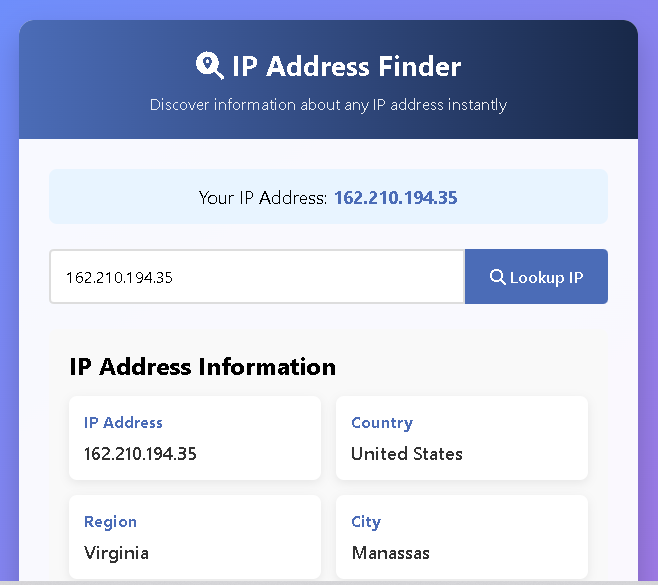
An IP Address Finder is a simple tool that converts an IP address into useful, human-readable information — like the country, city, internet service provider (ISP), and timezone associated with that IP. Whether you’re troubleshooting a network, moderating comments, or just curious about where website visitors come from, an IP Address Finder gives a quick snapshot that helps you make better, faster decisions.
IP Address Finder
Discover information about any IP address instantly
Fetching IP data…
IP Address Information
IP Address
–
Country
–
Region
–
City
–
ISP
–
Timezone
–
This guide explains what results to expect from an IP Address Finder, practical ways to use the information, what it can and can’t tell you, privacy and legal points to keep in mind, and easy troubleshooting steps when results are missing or seem wrong.
Also Use Our Free QR Code Generator Online| Create UPI, WiFi, vCard & More
What information does an IP Address Finder show?
Most IP Address Finder tools display a predictable set of fields. These are the items you should expect and how to interpret each:
- IP Address: The numeric address you looked up. This is the public IP visible to websites and services.
- Country / Region / City: Approximate location tied to the IP. Country-level data is usually reliable; city-level is often an estimate.
- ISP (Internet Service Provider): The company or organization that owns the IP block, such as a broadband company, data center, or mobile carrier.
- Timezone: The most likely timezone for that IP block — helpful when matching log times to local events.
- Extra notes: Some finders also provide latitude/longitude, connection type (mobile, broadband), or whether the IP belongs to a VPN or hosting provider.
Practical uses for an IP Address Finder
An IP Address Finder is useful across many everyday and professional tasks:
- Troubleshooting and support: Quickly check whether a reported problem might be linked to a specific ISP or region.
- Security triage: See where a suspicious login or comment came from to help prioritize investigation.
- Basic analytics check: Verify whether traffic originates from expected countries and regions.
- Content moderation: Spot patterns such as many signups from a single ISP or region that might indicate abuse.
- Scheduling and coordination: Use timezone info to plan outreach or support at the right local time.
What an IP Address Finder cannot do
It’s important to understand limits so you don’t over-rely on results:
- It won’t identify a person. An IP alone does not reveal a user’s name or exact street address in normal circumstances.
- It can be masked. VPNs, proxies, and some mobile carriers will show an exit node or gateway location, not the user’s true spot.
- City-level data can be wrong. Geolocation databases make best guesses and are more reliable at broader levels (country/region).
Reading results like a pro
When you use an IP Address Finder, read results with a healthy dose of context:
- If the country matches your expectations but the city doesn’t, accept country-level as useful and city-level as approximate.
- If the ISP field says “hosting provider” or names a well-known cloud company, the IP likely belongs to a server rather than a home user.
- Repeated suspicious events from the same IP block suggest pattern-level action (block, rate-limit), not immediate individual identification.
Privacy and legal considerations
Although IP addresses are widely used for technical and operational purposes, handle them responsibly:
- Don’t mix IP data with other personal data unless you have a valid reason and legal basis to do so.
- Be transparent when collecting IPs for analytics or security — a short privacy note or mention in your terms is best practice.
- Follow local rules. Laws and privacy guidance vary; when in doubt, treat IPs with care and consult legal counsel for high-risk uses.
Troubleshooting common issues
If an IP Address Finder shows incomplete or strange results, try these steps:
- Check your input: Ensure the IP number is correctly typed and not a hostname (unless the tool resolves domains).
- Try a different IP: Confirm the tool works by looking up a well-known public IP.
- Refresh or retry: Temporary API or network issues can cause missing fields. Wait a minute and try again.
- Compare with another finder: Different services use different databases; cross-checking helps verify results.
- Remember VPNs and mobile carriers: If the IP belongs to a VPN or carrier gateway, location may reflect the gateway, not the individual device.
Best practices for using IP data
If you plan to use IP lookup results in workflows or systems, follow these tips:
- Use IP data for decisions that don’t require exact identity. For example: rate-limiting, regional personalization, or filtering.
- Combine signals. Pair IP results with geolocation consent from the user or behavioral signals when you need higher confidence.
- Cache responsibly. If you lookup the same IP frequently, cache results for a reasonable time to reduce lookups and improve speed.
- Respect rate limits. If using a public lookup service, avoid excessive requests and consider a paid tier for production needs.
Quick FAQ
Q: Is an IP Address Finder legal to use?
A: Yes, using an IP Address Finder is legal for common tasks like analytics and security, but how you store or use the data may be subject to privacy laws.
Q: Can I find out who owns an IP?
A: You can usually find the organization or ISP that owns the IP block, but not a private individual’s identity.
Q: Are free IP finders accurate?
A: They’re fine for general use. For critical business needs, consider services with higher accuracy and SLAs.
Conclusion
An IP Address Finder is a fast, practical tool for getting a snapshot of where internet traffic comes from and which networks are involved. Use it to enhance troubleshooting, security, and basic analytics — but always remember its limits: IP results are best used for patterns and context, not for identifying individuals. When combined with clear privacy practices and sensible cross-checking, an IP Address Finder becomes a reliable, low-effort tool that adds valuable context to your online work.

Post Comment