Professional Unit Converter Online — Fast & Accurate Online Tool
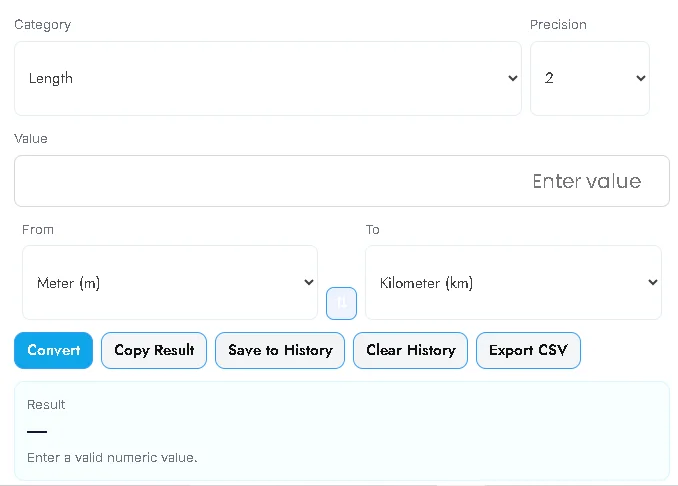
We built this Professional Unit Converter to save time and remove guesswork. It’s a lightweight, responsive web tool that converts units across many categories instantly: Length, Mass, Temperature, Area, Volume, Speed, Time, Data, Energy, Pressure and more. No backend required — it runs entirely in the browser, offers precision control, history, CSV export, and accessibility-friendly UI.
Key benefits
- Instant & accurate: Converts as you type or when you click Convert.
- Many unit categories: Covers everyday and professional units.
- Proper temperature handling: Uses correct formulas for °C ↔ °F ↔ K.
- Local history: Save recent conversions in
localStorage, export as CSV. - SEO & performance friendly: Single-file, minimal dependencies => fast load time.
- Responsive & accessible: Works on mobile and desktop; keyboard friendly.
Features (what users get)
- Multiple categories: Length, Mass, Temperature, Area, Volume, Speed, Time, Data, Energy, Pressure.
- Precision selector (0–4 decimals).
- Swap units feature (From ↔ To).
- Copy result, Save to History, Clear History, Export CSV.
- Built-in self-test to verify conversion accuracy.
- All front-end — no API keys or internet required.
How to use (step-by-step)
- Enter a value in the Value field.
- Choose a category (Length, Temperature, etc.).
- Pick From and To units (e.g., Meter → Kilometer).
- Set precision (decimal places).
- Click Convert or press Enter — the result appears instantly.
- Save to History to keep this conversion, or Export CSV to download history
Practical examples
1 meter→100 centimeters1 kg→2.20462 lb0 °C→32 °F1000 L→1 m³36 km/h→10 m/s
also use : Ultra Clear Image Enhancer for Sharper, Professional Photos
FAQ (for users / schema ready)
Q: Does the tool work offline?
A: Yes — it runs fully in the browser and does not require online APIs.
Q: Are temperature conversions accurate?
A: Yes — temperature conversions use correct formulas (via Kelvin as an intermediary).
Q: Can I export saved conversions?
A: Yes — you can export your history as a CSV file.
Q: Can I add my own units?
A: The converter file is single-file JavaScript/HTML — a developer can add custom units quickly.



Post Comment